 พี่ง้วง - สถาบันติดกระดุมเม็ดแรก
พี่ง้วง - สถาบันติดกระดุมเม็ดแรก Facebook ad: “สร้างคอนเท้นท์ด้วย GPT-Image-2 แบบที่เขาไม่สอนกัน”
Ran for 81 days, from July 3 to September 22, 2026, the last day Crush saw it.
Run by พี่ง้วง - สถาบันติดกระดุมเม็ดแรก on Facebook. Crush is not the advertiser and does not verify its claims. See this ad in Meta's Ad Library(opens in a new tab)
Want an ad like this for your product?
Crush makes new ad images for your product from this ad: your logo, your product photo, your offer.
Trials from $19.95 USD, then $79.95 USD a month. Cancel anytime.
About this ad
- Meta Ad Library ID
- 1538951451057065
- Platforms
- Facebook, Instagram, Audience Network and Messenger
- Relaunches
- 0
- Niche
- AI & Software
Ad text
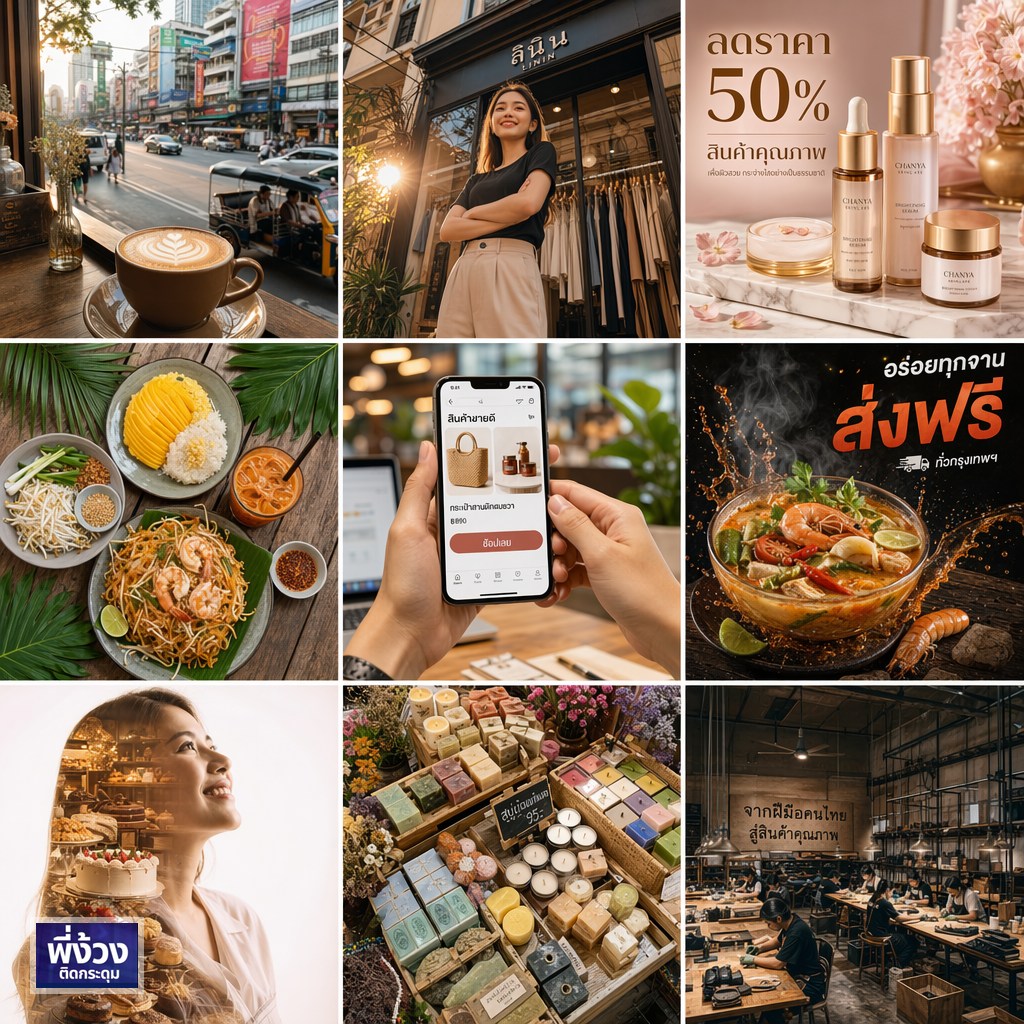
สร้างคอนเท้นท์ด้วย GPT-Image-2 แบบที่เขาไม่สอนกัน 🔥 . ถ้าคุณยังพิมพ์ prompt แค่ "สร้างภาพแมวน่ารัก" แล้วรอผลลัพธ์แบบงั้นๆ วันนี้พี่ง้วงจะมาเปิดเทคนิคการเขียน prompt ให้ GPT-Image-2 แบบคมๆ ทุกรูปออกมาเป๊ะ! . ภาพที่เห็นนี่คือ GPT-Image-2 สร้างทั้งหมด 9 รูปใน 1 prompt เดียว จาก POV ร้านกาแฟ ถ่ายสินค้า ถ่ายอาหาร ทำ banner โฆษณา จนถึง portrait ศิลปะ ทำได้ทั้งหมดด้วย AI ตัวเดียว . เทคนิคที่ 1️⃣: ระบุกล้องและเลนส์ อย่าพิมพ์แค่ "ภาพสวยๆ" ให้ระบุให้ชัด: → "Shot on Canon EOS R5, 24-70mm f/2.8, f/1.8 aperture, 1/250s, ISO 200" ยิ่งระบุรายละเอียดกล้อง ภาพยิ่งออกมาเหมือนถ่ายจริง . เทคนิคที่ 2️⃣: ระบุมุมถ่าย (POV) GPT-Image-2 เก่งเรื่องมุมถ่าย ถ้าเราบอกให้ชัด: → "First-person POV from inside a coffee shop looking out through window" → "Low-angle dramatic shot from ground level looking up" → "Bird-eye view directly overhead flat-lay" → "Over-the-shoulder shot looking at smartphone screen" มุมถ่ายเปลี่ยน = ความรู้สึกเปลี่ยนทันที . เทคนิคที่ 3️⃣: ระบุแสงและบรรยากาศ → "Golden hour backlight, warm amber tones, soft lens flare" → "Dark moody lighting, single directional light from left" → "Studio softbox lighting, clean white background, no shadows" แสงคือหัวใจของภาพ ให้ AI รู้ว่าเราอยากได้แสงแบบไหน . เทคนิคที่ 4️⃣: ระบุ text ที่ต้องการให้ปรากฏบนภาพ GPT-Image-2 เก่งเรื่อง render ตัวหนังสือมากๆ ให้ใส่ text ที่ต้องการลงไปใน prompt โดยใช้ quote: → "Thai text 'ลดราคา 50%' clearly visible on the banner" → "Product label reads 'สินค้าคุณภาพ' in bold Thai typography" → ลองดูรูป banner ในโพสต์นี้ ตัวหนังสืออ่านออกจริงๆ! . เทคนิคที่ 5️⃣: ใช้ photography style keywords → "National Geographic quality documentary shot" → "Vogue editorial fashion photography" → "Instagram aesthetic, warm tones, shot on iPhone" → "Dark moody food photography, Michelin star style" คำเหล่านี้สื่อถึง mood ทั้งก้อน ทำให้ AI เข้าใจ vibe ที่เราต้องการทันที . เทคนิคที่ 6️⃣: Prompt ยาว = ผลลัพธ์ละเอียด ไม่ต้องกลัวที่จะเขียน prompt ยาว GPT-Image-2 รองรับถึง 32,000 ตัวอักษร! ยิ่งระบุละเอียด เช่น: → "visible fine pores on cheeks, soft peach fuzz catching light, subtle subsurface scattering" → "fabric weave texture visible, metallic sheen on heel catching flash" ภาพยิ่งออกมา real ขึ้น จนแยกไม่ออกว่า AI สร้าง . เทคนิคที่ 7️⃣: สร้างหลายฉากใน 1 prompt ลองเขียนแบบ collage: → "A 3x3 grid showing 9 different scenes: [scene 1], [scene 2], ... each image in a different style" GPT-Image-2 จัด layout ให้เองได้ ดูผลลัพธ์ในโพสต์นี้เลยครับ 9 มุม 9 สไตล์ จาก 1 prompt! . 💡 สรุป: Formula ที่ใช้ได้ทุกรูป กล้อง + เลนส์ + มุมถ่าย + แสง + สไตล์ + text (ถ้ามี) + รายละเอียด texture/skin/material . ตัวอย่าง prompt ที่ใช้สร้างรูปในโพสต์นี้: "POV shot from inside a Thai coffee shop, latte with latte art on table, Instagram aesthetic, warm tones, shot on iPhone — Canon EOS R5, 50mm f/1.4, golden hour lighting" ได้ผลลัพธ์เหมือนถ่ายจริง! . ถ้าอยากเรียนรู้เทคนิค prompt แบบลึกขึ้น พิมพ์ "สนใจ" มาได้เลยครับ โพสต์หน้าพี่ง้วงจะมา "ปล่อยของ" คอร์สสอนใช้ AI สร้างภาพสำหรับ SME แบบ step-by-step ติดกระดุมเม็ดแรกให้ถูกตั้งแต่รูปแรก! 💪 . ลุยกันครับ! 🚀 . #พี่ง้วง #ติดกระดุม #GPTImage2 #PromptEngineering #AIImage #AIForSME #ContentCreator #AIImageGeneration #OpenAI #SMEThailand #คนทำธุรกิจ