 SkillGeek
SkillGeek Facebook ad: “AI Communication & Content Creation”
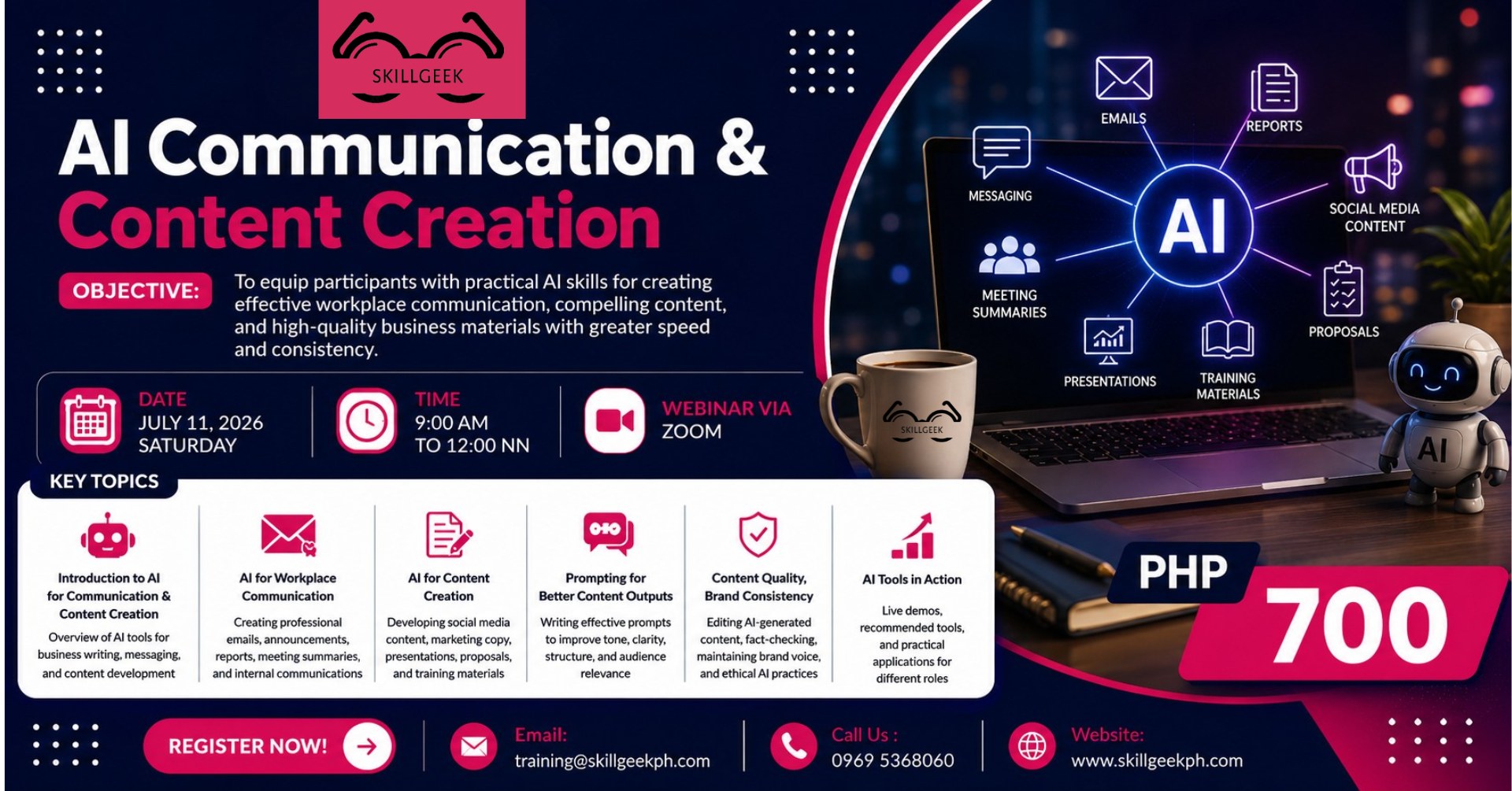
Ran for 4 days, from June 27 to June 30, 2026, the last day Crush saw it.
Run by SkillGeek on Facebook. Crush is not the advertiser and does not verify its claims. See this ad in Meta's Ad Library(opens in a new tab)
Want an ad like this for your product?
Crush makes new ad images for your product from this ad: your logo, your product photo, your offer.
Trials from $19.95 USD, then $79.95 USD a month. Cancel anytime.
About this ad
- Meta Ad Library ID
- 2758733871177183
- Platforms
- Relaunches
- 0
Ad text
Date : July 11,2026 (Saturday) Time : 9:00 am to 12:00nn Investment Fee : Php 700 per participant / 3 or more Php 600.00 Reserve your slot now! https://forms.gle/ng3kYk6bYR2wcRGS7 Learning Objectives By the end of this 3-hour webinar, participants will be able to: – Identify the right AI tools for communication and content creation tasks – Draft professional workplace communications using AI — emails, announcements, reports, meeting summaries – Create external and marketing content using AI — social media, copy, presentations, proposals, training materials – Write effective prompts that control tone, structure, clarity, and audience relevance – Edit, fact-check, and refine AI-generated content to maintain accuracy and brand voice – Use AI responsibly and ethically in professional communication and content work MODULE 1 Introduction to AI for Communication & Content Creation Establishes shared vocabulary and sets the scope for the session. This module is concept-only — no writing tasks are attempted here. 1.1 The AI Writing Landscape – Categories of AI writing tools: conversational AI, writing assistants, content generators – Key platforms: Claude, ChatGPT, Gemini, Copilot, Jasper, Copy.ai — what each is best for – Which tool to use for which task: a quick decision framework 1.2 Two Domains — One Session – Workplace communication: internal messages, reports, formal documents – Content creation: marketing, social media, external-facing materials – Why they require different skills, tones, and AI approaches — covered in Modules 2 and 3 separately 1.3 What AI Writing Can and Cannot Do – Where AI excels: drafting, reformatting, tone-shifting, and generating options fast – Where it falls short: factual accuracy, insider knowledge, nuanced judgment – The human-AI collaboration model: AI drafts, humans lead MODULE 2 AI for Workplace Communication Covers internal and professional business writing only. 2.1 Professional Email Writing with AI – Drafting clear, professional emails from bullet points or rough ideas – Writing tone-appropriate messages: formal, semi-formal, and direct styles – Difficult emails: decline messages, follow-ups, escalations, and sensitive topics – Proofreading and improving existing email drafts using AI 2.2 Announcements & Internal Communications – Writing company announcements, policy updates, and team memos with AI – Adapting messages for different internal audiences: all-staff vs. leadership vs. team-level – Maintaining clarity and appropriate tone in official internal communications 2.3 Reports & Meeting Summaries – Using AI to structure and draft business reports from notes or data points – Turning meeting notes or transcripts into clean, action-oriented summaries – Generating action items, decisions, and follow-up tasks from discussion records MODULE 3 AI for Content Creation Covers external-facing and marketing content only. Internal communications were completed in Module 2. This module focuses on content that reaches customers, audiences, or external stakeholders. 3.1 Social Media Content with AI – Writing platform-specific posts: LinkedIn, Facebook, Instagram, and X/Twitter – Generating content calendars and post ideas from a brief or campaign theme – Adapting a single message for multiple platforms without rewriting from scratch – Captions, hashtags, and calls to action: prompting for each element separately 3.2 Marketing Copy & Campaigns – Writing product descriptions, taglines, and promotional copy with AI – Generating variations: A/B testing different headlines, angles, and CTAs – Campaign briefs: using AI to draft a short creative brief from a product or goal 3.3 Presentations & Proposals – Building slide content, talking points, and executive summaries using AI – Drafting business proposals and pitch decks from a brief or background document – Structuring a data-driven narrative: context → insight → recommendation MODULE 4 Prompting for Better Content Outputs Dedicated entirely to prompt engineering technique. 4.1 What Makes a Good Prompt – The four elements of an effective prompt: Role, Context, Task, Format – Vague vs. specific: why the quality of your input determines the quality of the output – Giving AI the right information without overloading it 4.2 Controlling Tone, Clarity & Structure – Prompting for specific tones: professional, conversational, urgent, empathetic, persuasive – Controlling length and structure: bullet points, paragraphs, numbered lists, headers – Specifying the audience in your prompt: ‘write this for a C-suite executive’ vs. ‘write this for a new employee’ 4.3 Iteration & Refinement – When the first output isn’t right: how to follow up without starting over – Refinement prompts: ‘make this shorter’, ‘change the tone to be more direct’, ‘add a closing call to action’ – Building a reusable prompt template for your most common writing tasks 4.4 Audience-Relevant Content – Writing for different audiences in one session: using AI to adapt the same message – Prompting for cultural sensitivity and professional appropriateness – Testing audience fit: asking AI to critique your draft from a specific reader’s perspective MODULE 5 Content Quality, Brand Consistency & Ethical Covers the skills needed after AI generates content: editing, verification, brand alignment, and responsible use. 5.1 Editing AI-Generated Content – Why all AI output requires human review before publishing or sending – The editing checklist: clarity, accuracy, tone, audience fit, and completeness – Spotting AI tells: generic phrasing, overlong sentences, and unnatural transitions – Making AI content sound like you: the humanization pass 5.2 Fact-Checking & Accuracy – AI hallucinations: what they are, why they happen, and how to catch them – What to verify: statistics, names, dates, quotes, product claims, and legal statements – Cross-referencing AI output with primary sources before publishing 5.3 Maintaining Brand Voice – What brand voice is — and why AI defaults to a generic version of it – How to train AI to write in your brand’s tone: voice descriptors and examples – Brand consistency checklist: language, terminology, formatting, and values 5.4 Ethical AI Use in Communication & Content – Transparency: when to disclose AI assistance in professional and public-facing content – Originality and attribution: avoiding unintentional plagiarism from AI-generated text – Confidentiality: what business information should never be entered into a public AI tool – Accuracy as a professional responsibility: your name is on the output, not the AI’s
Where the ad sends people
AI Communication & Content Creation
AI Communication & Content Creation
Date : July 11,2026 (Saturday) Time : 9:00 am to 12:00nn Investment Fee : Php 700 per participant / 3 or more Php 600.00 Reserve your slot now! https://forms.gle/ng3kYk6bYR2wcRGS7 Learning Objectives By the end of this 3-hour webinar, participants will be able to: – Identify the right AI tools for communication and content creation tasks – Draft professional workplace communications using AI — emails, announcements, reports, meeting summaries – Create external and marketing content using AI — social media, copy, presentations, proposals, training materials – Write effective prompts that control tone, structure, clarity, and audience relevance – Edit, fact-check, and refine AI-generated content to maintain accuracy and brand voice – Use AI responsibly and ethically in professional communication and content work MODULE 1 Introduction to AI for Communication & Content Creation Establishes shared vocabulary and sets the scope for the session. This module is concept-only — no writing tasks are attempted here. 1.1 The AI Writing Landscape – Categories of AI writing tools: conversational AI, writing assistants, content generators – Key platforms: Claude, ChatGPT, Gemini, Copilot, Jasper, Copy.ai — what each is best for – Which tool to use for which task: a quick decision framework 1.2 Two Domains — One Session – Workplace communication: internal messages, reports, formal documents – Content creation: marketing, social media, external-facing materials – Why they require different skills, tones, and AI approaches — covered in Modules 2 and 3 separately 1.3 What AI Writing Can and Cannot Do – Where AI excels: drafting, reformatting, tone-shifting, and generating options fast – Where it falls short: factual accuracy, insider knowledge, nuanced judgment – The human-AI collaboration model: AI drafts, humans lead MODULE 2 AI for Workplace Communication Covers internal and professional business writing only. 2.1 Professional Email Writing with AI – Drafting clear, professional emails from bullet points or rough ideas – Writing tone-appropriate messages: formal, semi-formal, and direct styles – Difficult emails: decline messages, follow-ups, escalations, and sensitive topics – Proofreading and improving existing email drafts using AI 2.2 Announcements & Internal Communications – Writing company announcements, policy updates, and team memos with AI – Adapting messages for different internal audiences: all-staff vs. leadership vs. team-level – Maintaining clarity and appropriate tone in official internal communications 2.3 Reports & Meeting Summaries – Using AI to structure and draft business reports from notes or data points – Turning meeting notes or transcripts into clean, action-oriented summaries – Generating action items, decisions, and follow-up tasks from discussion records MODULE 3 AI for Content Creation Covers external-facing and marketing content only. Internal communications were completed in Module 2. This module focuses on content that reaches customers, audiences, or external stakeholders. 3.1 Social Media Content with AI – Writing platform-specific posts: LinkedIn, Facebook, Instagram, and X/Twitter – Generating content calendars and post ideas from a brief or campaign theme – Adapting a single message for multiple platforms without rewriting from scratch – Captions, hashtags, and calls to action: prompting for each element separately 3.2 Marketing Copy & Campaigns – Writing product descriptions, taglines, and promotional copy with AI – Generating variations: A/B testing different headlines, angles, and CTAs – Campaign briefs: using AI to draft a short creative brief from a product or goal 3.3 Presentations & Proposals – Building slide content, talking points, and executive summaries using AI – Drafting business proposals and pitch decks from a brief or background document – Structuring a data-driven narrative: context → insight → recommendation MODULE 4 Prompting for Better Content Outputs Dedicated entirely to prompt engineering technique. 4.1 What Makes a Good Prompt – The four elements of an effective prompt: Role, Context, Task, Format – Vague vs. specific: why the quality of your input determines the quality of the output – Giving AI the right information without overloading it 4.2 Controlling Tone, Clarity & Structure – Prompting for specific tones: professional, conversational, urgent, empathetic, persuasive – Controlling length and structure: bullet points, paragraphs, numbered lists, headers – Specifying the audience in your prompt: ‘write this for a C-suite executive’ vs. ‘write this for a new employee’ 4.3 Iteration & Refinement – When the first output isn’t right: how to follow up without starting over – Refinement prompts: ‘make this shorter’, ‘change the tone to be more direct’, ‘add a closing call to action’ – Building a reusable prompt template for your most common writing tasks 4.4 Audience-Relevant Content – Writing for different audiences in one session: using AI to adapt the same message – Prompting for cultural sensitivity and professional appropriateness – Testing audience fit: asking AI to critique your draft from a specific reader’s perspective MODULE 5 Content Quality, Brand Consistency & Ethical Covers the skills needed after AI generates content: editing, verification, brand alignment, and responsible use. 5.1 Editing AI-Generated Content – Why all AI output requires human review before publishing or sending – The editing checklist: clarity, accuracy, tone, audience fit, and completeness – Spotting AI tells: generic phrasing, overlong sentences, and unnatural transitions – Making AI content sound like you: the humanization pass 5.2 Fact-Checking & Accuracy – AI hallucinations: what they are, why they happen, and how to catch them – What to verify: statistics, names, dates, quotes, product claims, and legal statements – Cross-referencing AI output with primary sources before publishing 5.3 Maintaining Brand Voice – What brand voice is — and why AI defaults to a generic version of it – How to train AI to write in your brand’s tone: voice descriptors and examples – Brand consistency checklist: language, terminology, formatting, and values 5.4 Ethical AI Use in Communication & Content – Transparency: when to disclose AI assistance in professional and public-facing content – Originality and attribution: avoiding unintentional plagiarism from AI-generated text – Confidentiality: what business information should never be entered into a public AI tool – Accuracy as a professional responsibility: your name is on the output, not the AI’s
Event rsvp: facebook.com(opens in a new tab)