
Key Takeaways
- 1To pause a mobile Instagram Reel or Story, simply press and hold your finger flat against the center of the screen.
- 2Desktop Instagram users can pause any playing video by clicking once directly inside the video player frame.
- 3Advertisers intentionally use flash-frames and dense text to force users to pause, which increases dwell time and algorithmic delivery.
- 4Crush data shows the most successful Instagram ads run for over 200 days, utilizing complex on-screen value propositions.
- 5The 'Learn More' CTA dominates long-running Instagram ads, appearing on 36 percent of top creatives.
A complete guide to pausing Instagram Reels and videos on mobile and desktop. Discover why top media buyers intentionally design ad creatives to force users to freeze the screen.
To pause a video or Reel on Instagram in 2026, simply press and hold your finger anywhere on the screen. The video freezes instantly and stays paused as long as your finger remains pressed.
When you release your finger, the video resumes automatically. Desktop users can click the video once to pause it.
How to pause an Instagram Reel on a mobile device
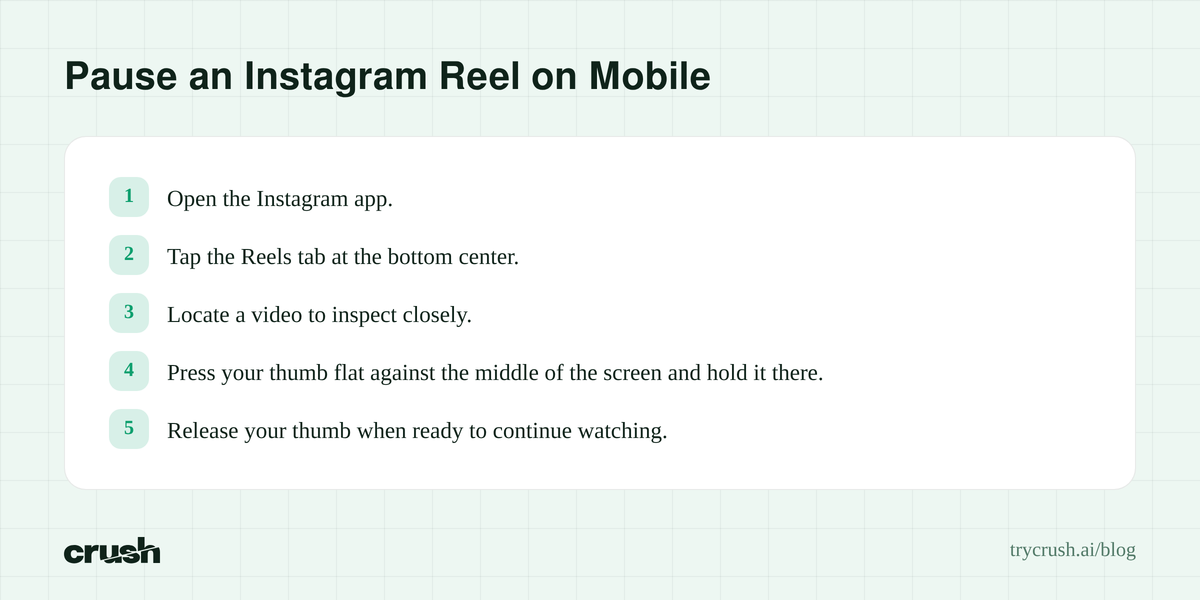
Pressing and holding the screen is the only native way to stop a Reel from playing in the Instagram mobile app. The platform designed this gesture to keep user navigation seamless while scrolling vertically.
Step by step instructions for mobile Reels
- Open the Instagram app and tap the Reels tab at the bottom center of the interface.
- Locate a video you want to inspect closely.
- Press your thumb flat against the middle of the screen and hold it there.
- Release your thumb when you are ready to continue watching.
Expected result: The video playback stops immediately. The user interface elements, including the creator username and caption, disappear so you can see the full frame clearly.
Practical pitfall: Tapping the screen quickly instead of pressing and holding will simply mute or unmute the video audio. You must keep your finger anchored to the glass.
How to pause an Instagram Story video
Instagram Stories use the same hold gesture as Reels but with slightly different navigation mechanics. Users tap the sides of the screen to skip forward or backward through Stories.
Step by step instructions for mobile Stories
- Tap on any active Story ring at the top of your Instagram home feed.
- Wait for a video format Story to begin playing.
- Place your finger in the dead center of the screen and hold it down securely.
- Lift your finger to allow the Story to finish its 15 to 60 second duration.
Expected result: The Story timer bar at the top of the screen freezes in place, and video playback halts entirely.
If you love interacting with dynamic content or frequently put GIFs on Instagram to enhance your Stories, this pause feature gives you a chance to read fast-moving animated text or inspect stickers closely without missing the moment.
Practical pitfall: If you press too close to the left or right edge of the screen, the app may register the gesture as a navigation tap. This will skip you to the next user or previous Story instead of pausing the current one.
How to pause an in-feed Instagram video
Standard feed videos behave a bit differently than Reels or Stories in 2026. Meta has merged most video formats, but legacy in-feed carousels and standalone posts still exist.
Step by step instructions for the home feed
- Scroll down your primary Instagram home feed until you encounter an auto-playing video post.
- Ensure the video is fully in view on your screen.
- Tap the center of the video frame once quickly.
- Tap the center of the frame again to resume playback.
Expected result: A small white play button icon briefly flashes in the center of the frame, and the video stops moving.
Practical pitfall: Double tapping the screen in rapid succession will trigger the like animation. A giant red heart will appear, and the video will continue playing without interruption.
How to pause Instagram video on a desktop browser
Desktop users navigate Instagram with a mouse, rendering the press and hold gesture impossible. Meta adapted the web interface to rely on simple clicks.
Step by step instructions for desktop
- Navigate to the Instagram website on your desktop browser.
- Scroll to any playing video or click into the dedicated Reels tab on the left sidebar.
- Click your left mouse button once anywhere inside the video player border.
- Click a second time to start the video again.
Expected result: The video halts instantly. A static play button icon remains visible in the center of the screen until you click again.
Practical pitfall: Clicking the text caption or the comment section area next to the video will not pause playback. You must click directly on the moving video footage itself.
Why media buyers want you to pause their Instagram video
Advertisers view the pause mechanic as a high intent engagement signal. When you know how to pause a video on Instagram, you naturally do it when something catches your eye. Media buyers track these interaction metrics religiously.
The algorithmic power of dwell time
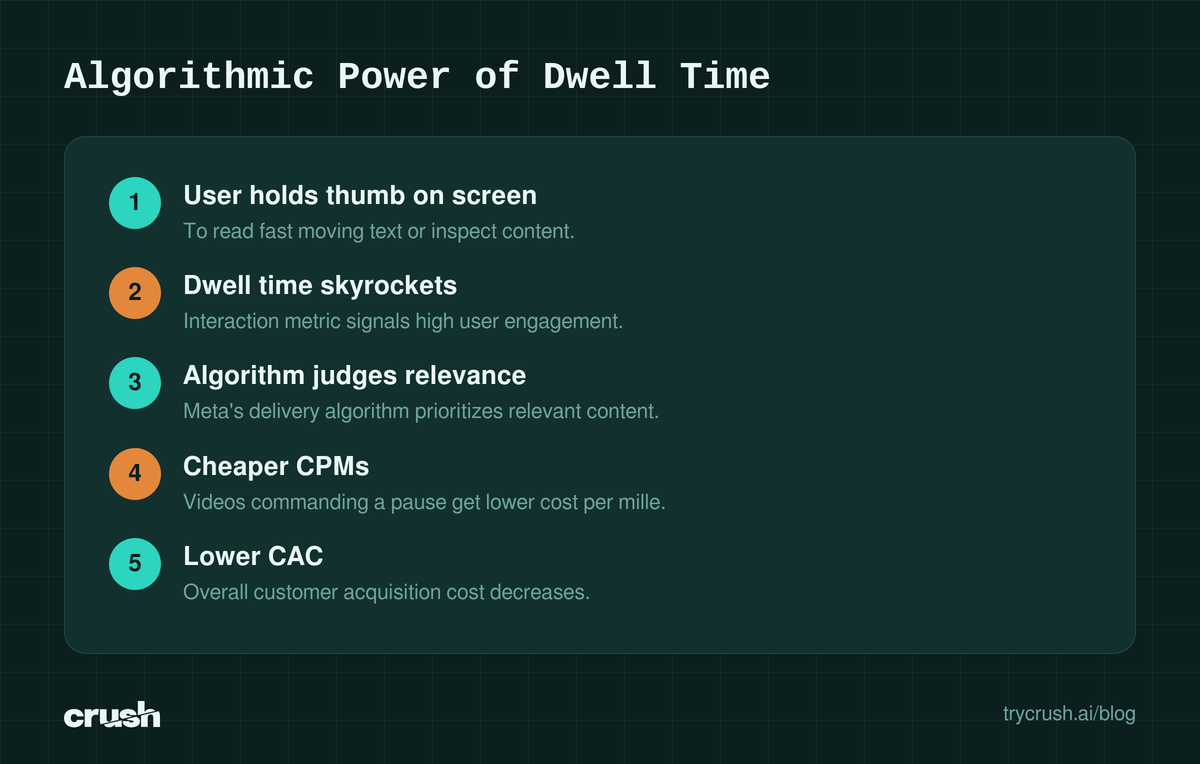
Every time a user holds their thumb on the screen to read a fast moving text block in an ad, the dwell time for that impression skyrockets. According to Meta's technical documentation, the delivery algorithm uses dwell time to judge content relevance.
Grasping how the system evaluates this attention is essential for mastering AI creative advertising.
If you launch a new campaign and say your target CPA is $50, you need the algorithm to prioritize your ad in the auction. Videos that command a pause get cheaper CPMs. They signal to Meta that the user is highly engaged, lowering your overall customer acquisition cost.
What our data reveals about winning Instagram video ads
We do not have to guess what works on Instagram. Crush, our AI Facebook ads platform, continuously monitors the ecosystem. We track competitors' Facebook ads via the Meta Ad Library and keep the history forever, including ads that the advertiser took down.
Learning how to search the Facebook Ad library like a pro gives you an edge in uncovering these tactics.
Analyzing the volume of Instagram specific ads
Our product Crush currently tracks exactly 1,768,902 unique Facebook ads across all niches. Within that active database, 440,131 creatives are currently running live in the auction.
When we filter this massive dataset for creatives that specifically target the platform by matching the keyword "instagram" in their copy or parameters, we see clear patterns. We found 1,515 tracked ads match "instagram" in our system, with 137 active right now.
Among top "instagram" ads, the average run time is 221 days, and 181 of the top 400 creatives ran for 90 or more days to hit the proven winner threshold.
Call to action preferences
The call to action button is the final step after a user unpauses your video. Our data shows a distinct hierarchy in CTA choices for ads optimized for Instagram, mirroring proven call to action examples across broader Meta placements.
- The "Learn More" button dominates, appearing on 36 percent of these top ads.
- The "Shop Now" button follows at 19 percent, driven heavily by e-commerce brands.
- The "WhatsApp Message" button captures 17 percent, showing massive international adoption for direct conversational commerce.
Deep dive into the longest running Instagram creatives
Ad longevity is the ultimate proxy for profitability. Media buyers turn off losing ads within days. If an ad runs for years, it is printing money.
Top five proven winners
We pulled the top five longest running ads from our database that heavily index on Instagram placement data. None of these top five have been relaunched. They have run continuously from their original start date.
| Advertiser | Days Running | CTA Button | Opening Hook Text |
|---|---|---|---|
| KlickPiloten | 2227 | contact us | Die Digital-Marketing KlickPiloten Beratung... |
| wilov | 2189 | learn more | wilov, la 1ère assurance auto à l’usage... |
| Genera Studios | 1865 | learn more | (Video Hook Only) |
| ALEC at the University of Tennessee | 1377 | learn more | Our highly flexible programs will allow you... |
| LGCY Power | 1334 | learn more | LGCY Power has been recognized by... |
Why these specific ads survive
The KlickPiloten ad has been running 2227 days and relaunched 0 times. Their opening line reads: "Die Digital-Marketing KlickPiloten Beratung & Agentur aus #Stuttgart, #Hamburg und #Berln: SEO, SEA, Social und Amazon Kampagnen für B2B & B2C." This dense text forces interested B2B buyers to pause the video just to read the locations and services offered.
Similarly, the wilov ad ran 2189 days and relaunched 0 times with a "learn more" CTA. Their opening line: "wilov, la 1ère assurance auto à l’usage pour arrêter de payer plein pot. Nous résilions votre ancienne assurance pour vous. Sans engagement." They use complex value propositions on screen, requiring users to hold the screen to process the insurance offer.
ALEC at the University of Tennessee has been running 1377 days and relaunched 0 times. Their CTA is "learn more" and their opening line: "Our highly flexible programs will allow you to obtain a degree through traditional coursework or entirely online." Education ads require high trust and high information density. Users regularly pause these videos to read the degree requirements flashed on screen.
LGCY Power ran 1334 days, relaunched 0 times, also utilizing "learn more". Opening line: "LGCY Power has been recognized by @bestcompanyUSA's 2022 Companies to Watch! We're experiencing unprecedented growth and have been consistently recognized as on". They leverage social proof text that moves quickly, demanding a pause from interested homeowners.
Genera Studios ran 1865 days and relaunched 0 times using the "learn more" CTA, relying heavily on visual software demonstrations that prompt musicians to pause and inspect the audio plugins on screen.
Creative tactics to force a video pause
Now that you know how to pause an Instagram video, you must engineer your creatives to trigger this exact user behavior. High performing media buyers use specific psychological triggers.
The flash frame promo code
The most common tactic to drive a forced pause is the flash frame. Advertisers place a massive discount code on the screen for exactly 0.5 seconds. If the user wants the 20 percent discount, they have no choice but to press and hold the screen to read it. This spikes dwell time and signals high purchase intent to the Meta algorithm.
Dense comparison charts
Another reliable tactic is flashing a feature comparison chart. Put your product next to a competitor and list ten bullet points of features. Do not leave the chart on screen long enough to read naturally. The user will pause the video to read the specific line items they care about most.
Hidden easter eggs
Brands with cult followings hide secret URLs or upcoming product hints in the background of their video sets. They tell users in the caption to look closely at the background. Users spend thirty seconds pausing and scrubbing the video to find the hidden text.
Building pause optimized ads using AI automation
Finding the exact pacing that forces a pause without annoying the user requires aggressive testing. You cannot guess the optimal frame rate for your text overlays.
How our platform scales winners
Crush fully automatically runs Facebook ads from start to finish. Our system creates campaigns, scales winners, and kills losers without manual intervention. The platform relies on the longevity data and duplicate counts found in our database to identify strong winning ad signals.
When you find an ad that successfully forces user pauses, Crush can generate ad creative iterations directly from that winning reference ad. It tests different text densities, flash frame durations, and CTA button combinations against your target audience. This autonomous scaling is exactly why you need 100 ad variations instead of relying on just two or three manual edits.
You can research these mechanics yourself right now. Our free public ad library lives at trycrush.ai/ad-library. You can filter by niche, keyword, and active days running to see exactly how your competitors are designing their creatives to stop the scroll.
If you are ready to automate your media buying entirely, our paid plans start with a trial. You can view the current tiers at trycrush.ai/pricing to see how AI can manage your daily spend.
How we got this data
The numbers in this article come from Crush’s ad library: 1,768,902 unique Facebook ads tracked via the Meta Ad Library, 440,131 of them active at the time of writing. Ad examples reference real advertisers and their public ads. Data queried on 2026-08-12. Third-party product facts are attributed inline to their sources.
Frequently Asked Questions
Common questions about this topic
1Why does my Instagram video mute instead of pausing?
2Can I pause an Instagram live stream?
3How do I pause a video on Instagram without holding the screen?
4Does pausing an ad on Instagram charge the advertiser?
5Why do some Instagram videos skip to the next one when I try to pause?
About this article
This article was written with AI assistance. Ad examples and ad data come from the Crush ad library.
Written by

Rokas Steponavičius
Founder, CEORokas is the Founder and CEO of TryCrush.ai, an ex-IBM professional turned entrepreneur focused on building AI-driven growth platforms. With a strong background in ecommerce, performance marketing, media buying, and artificial intelligence, Rokas specializes in creating scalable, data-led systems that drive measurable revenue. His mission is to help modern businesses leverage AI to optimize acquisition, conversions, and long-term profitability.
Stop Guessing.
Start Crushing.
AI Ad Manager trained by world-class media buyers to generate your creatives and optimize your ads 24/7.
Learn more
Related articles
Proven Online Ad Examples Based on Meta Ad Longevity Data
Stop guessing what works. We analyzed millions of active campaigns to bring you the best online ad examples based on pure longevity and profitability data.
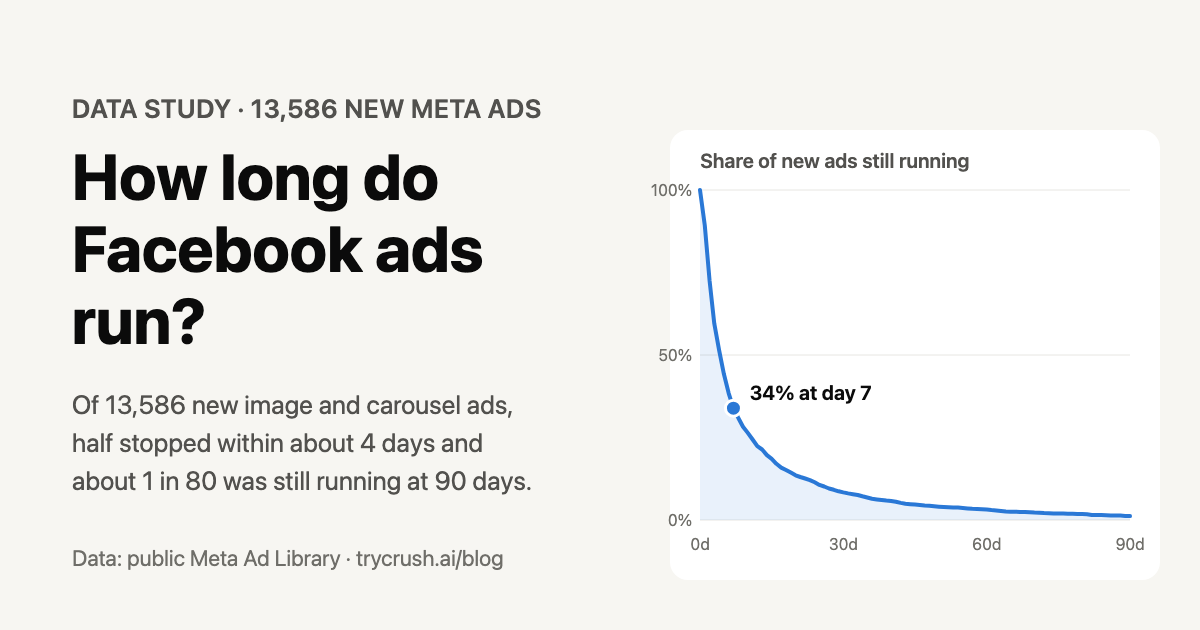
How Long Do Facebook Ads Run? We Followed 13,586 New Ads
What 13,586 new and 96,614 live Meta ads show about how long ads last, by format, button and niche, and how long to run yours.
Proven Facebook Group Description Examples for 2026
A high-converting Facebook group description treats its text like proven ad copy. Learn what works by analyzing active campaigns running for hundreds of days.
Reminder Advertising Examples: 3 Ads That Ran Over 500 Days
Explore real reminder advertising examples backed by proprietary 2026 data. Learn how top brands keep winning ads running for hundreds of days to maximize return on ad spend.