Key Takeaways
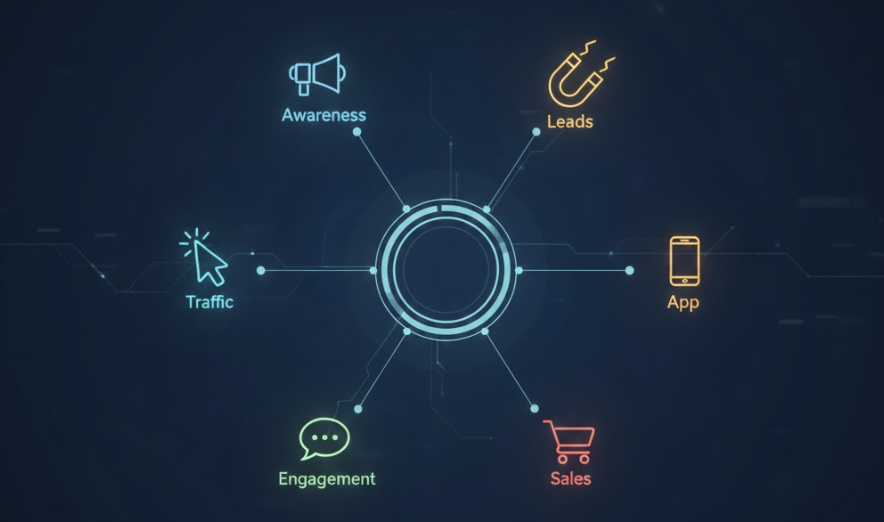
- 1Meta ODAX now streamlines advertising into 6 distinct Facebook campaign types
- 2Select the Sales objective for e-commerce to target active buyers over window shoppers
- 3Use Engagement campaigns for social proof building before running conversion ads
- 4Choose Leads over Sales for high-ticket services requiring phone or email follow-up
- 5Never use Traffic campaigns when your primary goal is generating actual revenue
Choosing the wrong objective is the #1 reason Facebook Ads fail. In this guide, we break down the 6 ODAX campaign types available in 2026 and help you decide which one drives actual revenue versus vanity metrics.
If you have been running Facebook Ads for a few years, you likely remember the "Old Days." Back then, there were 11 different campaign objectives. You had "Conversions," "Catalog Sales," "Store Traffic," "Video Views," "Brand Awareness," "Reach," "Messages"... it was a mess.
Thankfully, Meta simplified this process with ODAX (Outcome-Driven Ad Experiences). Now, there are only 6 types of Facebook campaigns to choose from.
However, simplified doesn't necessarily mean simple. Choosing the wrong objective is still the number one reason ad campaigns fail. If you pick "Engagement" when you actually want "Sales," you are explicitly telling the Meta algorithm to find the wrong audience.
In this guide, we will break down the 6 Facebook campaign types available in 2026. We will explain exactly what each objective does and help you decide which one is right for your business. To build a robust overall strategy, it is also highly recommended to understand how these campaigns fit into the broader advertising types of media.
Facebook Campaign Objectives: The 6 Choices Explained
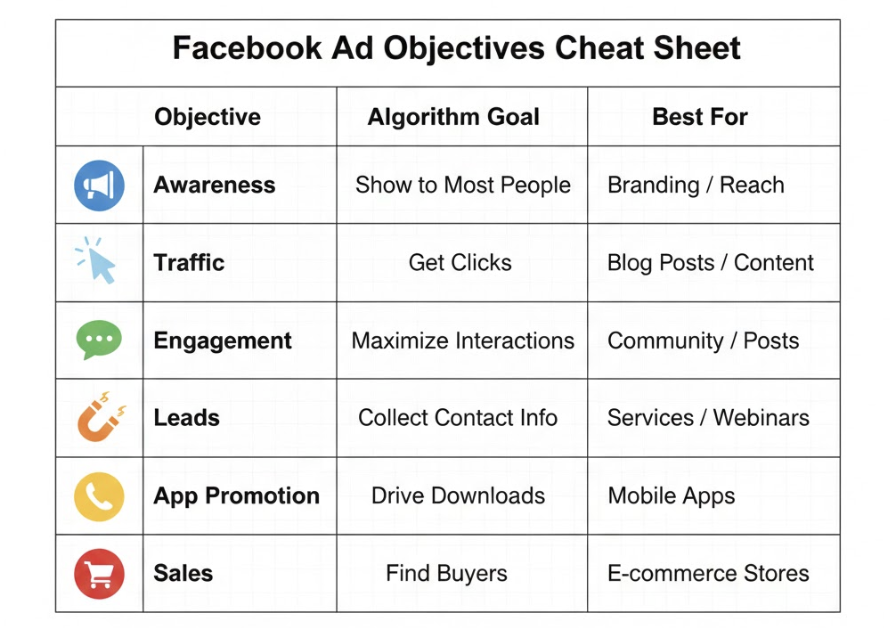
When you click the green "Create" button in Ads Manager, you are presented with these six foundational choices:
1. Awareness Campaigns: The Digital Billboard
The Goal: Maximize Reach (the number of unique people) or Impressions (the total number of views). The algorithm looks for users who are highly likely to recall seeing your ad later.
Use Case: Think of this objective like buying a digital billboard on a busy highway. You aren't asking the driver to pull over and buy a burger right now. You are planting a seed for future consideration. This is strictly a top-of-funnel strategy.
Best For:
- Big Brands: Companies like Nike or Coke reinforcing market dominance.
- Local Businesses: A restaurant announcing a grand opening to everyone within a 5-mile radius.
- Political Campaigns: Getting a crucial message out to a broad voter base.
The Trap: Beginners often love this campaign type because the CPM (Cost per 1,000 impressions) is incredibly cheap ($2-$5). But remember, "Reach" does not pay the bills. If you need direct sales to survive, avoid this objective entirely.
2. Traffic Campaigns: Driving Clicks
The Goal: Send people to a specific digital destination, such as a Website, an App, or a Facebook Event.
Use Case: As we discussed in our Mastering Facebook Traffic Campaigns guide, this objective is strictly for getting targeted eyeballs on free content.
Best For:
- Promoting a new blog post or industry news article.
- Sending targeted traffic to a podcast listening link.
3. Engagement Campaigns: The Social Proof Engine
The Goal: Find people who are addicted to interacting on social media. The Meta algorithm specifically hunts for users who love to Like, Comment, Share, or Watch Videos.
Use Case: While this is primarily a "vanity" objective, it serves a highly strategic use case known as "Post Stacking." Before launching a dedicated Sales ad, you run the creative as an Engagement ad for around $50 to quickly gather 500 likes and 50 comments.
Then, you take that "Social Proofed" ad ID and run it inside a Sales campaign. The high engagement makes your ad look significantly more trustworthy to potential buyers.
Best For:
- Building Retargeting Pools: Isolating "People who watched 50% of my video."
- Event Responses: Promoting attendance for a Facebook Event.
- Messenger & WhatsApp: Starting organic conversations for service businesses that don't rely on a website.
The Trap: You cannot pay your rent with Facebook "Likes." Never confuse basic Engagement with a true Conversion.
4. Lead Generation Campaigns: Capturing Information
The Goal: Securely collect direct contact information, such as Name, Email, and Phone Number.
Use Case: This is the absolute bread and butter for B2B and Service businesses. You can utilize "Instant Forms" that pop up seamlessly inside Facebook, or funnel users to an external optimized landing page.
Best For:
- Real Estate Agents looking for home buyers or sellers.
- Dentists and Chiropractors booking local appointments.
- B2B Software companies offering product demos.
- Brands driving high-quality Newsletter signups.
5. App Promotion Campaigns: Driving Installs
The Goal: Get interested users to successfully install your mobile app or take a specific internal action within the app.
Use Case: This is completely self-explanatory. If you have an iOS or Android application, this is the only objective you should be using. For more advanced implementation tactics, check out our deep dive on Facebook App Campaigns.
Best For:
- Mobile Games looking for a high volume of players.
- SaaS companies featuring a dedicated mobile app component.
6. Sales Campaigns: The Money Maker
The Goal: Find the exact people who actively buy things online. The algorithm ruthlessly optimizes for core "Conversions" like Purchases, Add to Carts, and Initiated Checkouts.
Use Case: This should be the default objective for 99% of businesses reading this guide. It targets the top 5-10% of users who are known as "active buyers." While these users are objectively more expensive to reach via higher CPMs, they are the ones who actually pull out their credit cards.
Best For:
- E-commerce: Selling physical goods and scaling e-commerce ads.
- Info Products: Successfully selling digital courses or ebooks.
- SaaS: Selling recurring software subscriptions.
The Trap: Many advertisers get scared by the initially high CPM/CPC and mistakenly switch to the "Traffic" objective. Don't do it. Paying a higher cost for high-quality buyers is a trade you should always make.
The "Catalog Sales" Nuance: Within the core Sales objective, you can also run "Catalog Sales" (formerly Dynamic Product Ads). This feature automatically displays the exact product a user previously viewed on your site. It is arguably the most powerful retargeting ad type for e-commerce. If you run a Shopify store, always ensure your product Catalog is fully synced and healthy.
Choosing the Right Facebook Campaign Type
Are you still unsure where to start? Here is a simple decision matrix to help you pick the exact right Facebook campaign type for your current goal:
- Do you have a product to sell online? Yes → Choose Sales.
- Do you need phone numbers/emails to call leads? Yes → Choose Leads.
- Do you have a mobile app? Yes → Choose App Promotion.
- Do you just want people to read your blog? Yes → Choose Traffic.
- Do you want people to message you on WhatsApp? Yes → Choose Engagement (or Leads).
Sales vs. Leads: The Conversion Confusion
You might naturally notice that "Sales" and "Leads" sound incredibly similar. Both are technically classified as "Conversions" by Meta.
The core difference lies in the depth of the user's commitment. A "Lead" (handing over an email address) presents a significantly lower barrier to entry than a "Sale" (handing over credit card information).
If you are trying to sell a high-ticket item, such as a $2,000 consulting package, you might start with a Leads objective to get prospects on a phone call, rather than pushing for a direct Sales objective.
Mastering Your Facebook Ad Objectives
The ultimate success of your Facebook Ad account quite literally starts with this first foundational click. If you choose the wrong objective, you are handing the algorithm a bad map.
You could have the absolute best ad creative in the world, but if you run it under a generic "Awareness" campaign, you will likely get millions of cheap views and zero actual dollars in return.
Be intentional with your strategy. Tell Meta exactly what business outcome you want to achieve.
Want to make sure your campaign structure is perfectly aligned? Crush sets up the optimal campaign objective automatically for your specific business type.
Frequently Asked Questions
Common questions about this topic
1What are the 6 types of Facebook campaigns in 2026?
2What is the difference between Leads and Sales objectives?
3When should I use the Awareness campaign objective?
4Should I use Traffic or Sales for my online store?
Written by
Albertas Pocius
Co-founder, CMOAlbertas is the Co-Founder and CMO of TryCrush.ai, bringing elite-level performance marketing expertise to the platform. With over $50M+ in combined Facebook and TikTok ad spend, Albertas has launched and scaled dozens of projects from zero, driven by a deep obsession with data and experimentation. He has trained 20+ media buyers, consulted 100+ companies, and is widely recognized as one of Europe’s early TikTok pioneers, likely the first to scale campaigns beyond $100K per day. Today, he also teaches advertising strategy at two colleges, shaping the next generation of media buyers.
Stop Guessing.
Start Crushing.
AI Ad Manager trained by world-class media buyers to generate your creatives and optimize your ads 24/7.
Learn more
Related articles
Mastering Facebook Traffic Campaigns: Strategy & Setup
Most advertisers misuse the Facebook Traffic objective. Discover why "traffic" is often a vanity metric and how to set up campaigns correctly using "Landing Page Views" to avoid bots. Perfect for content promotion and newsletter growth.
Facebook Ads 101: The Comprehensive Beginner’s Guide
Don't let the Ads Manager interface scare you. This guide breaks down the structure of Facebook ads and provides a clear playbook to launch your first sales campaign effectively.
4 Proven Marketing Goal Examples Backed by Real Ad Data
Learn how to map a theoretical marketing goal to a profitable advertising campaign using longevity and duplicate data from top-performing Facebook ads.
Facebook Ads for Ecommerce & Affiliate Marketing: The Dual Strategy
Discover the two primary ways to make money with Facebook ads: Ecommerce and Affiliate Marketing. This guide breaks down specific strategies for both, including creative tips, funnel structures, and compliance secrets to keep your ad account safe.