
Key Takeaways
- 1The Foreplay Chrome extension excels at manually saving ad inspiration from Facebook and TikTok, but lacks the deep performance metrics required by direct-response marketers.
- 2Pricing and billing issues are common G2 complaints, with heavy users facing steep API data costs up to $349 per month.
- 3Automated platforms like Crush reveal that the average winning extension ad runs for 216 days, a metric manual saving cannot track.
- 4High duplicate counts and long active run times are the truest signals of a profitable Facebook ad in 2026.
The Foreplay Chrome extension saves ad creatives with one-click, but lacks deep performance metrics. Discover its pricing, user complaints, and how automated alternatives track true ad longevity.
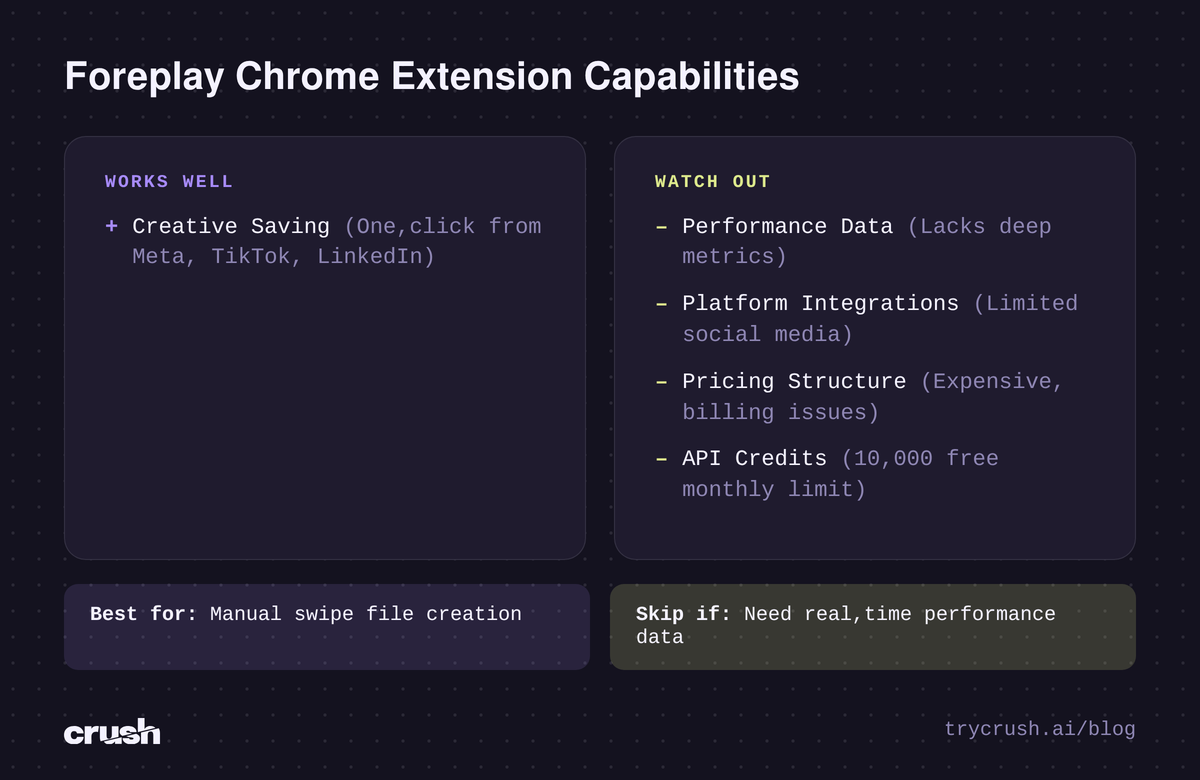
The Foreplay Chrome extension is a tool that allows media buyers to save ads with one-click from the Meta Ad Library, TikTok, and LinkedIn. While it saves creatives efficiently, it lacks deep performance metrics.
Crush, our platform, takes a different approach by tracking competitor ad longevity automatically to reveal proven winners.
What Is The Foreplay Chrome Extension?
The Foreplay Chrome extension is a tool designed to help media buyers build swipe files manually. According to Winning Hunter, the Chrome extension is highly regarded for effortlessly saving creatives with one-click from platforms like Facebook, TikTok, and LinkedIn.
Instead of relying on disorganized folders or broken links, teams use it to catalog competitor ad inspiration. According to G2 reviews, Foreplay is a significant time-saver for marketing teams, streamlining creative research and enhancing efficiency.
By consolidating visual assets into one interface, it removes the friction of manual screen recording. However, saving a video file is only the first step of the modern media buying process. Marketers still do not know if the saved ad is actually profitable.
Where Foreplay Falls Short For Media Buyers
The most critical metric for any media buyer is return on ad spend. An aesthetically pleasing video might look great in a swipe file, but it could be burning cash in the ad account.
Lack Of Performance Data
According to Trendtrack Blog, Foreplay is designed for ad creatives and inspiration but lacks real-time product-level research and deep performance metrics.
This is a notable limitation for e-commerce sellers and dropshippers. Without performance signals, buyers are guessing which saved creatives to replicate.
Platform And Integration Constraints
The extension focuses heavily on specific social feeds. According to G2 reviews, Foreplay has limited social media integration. Reviewers note this makes it less effective for non-social ad campaigns or Google Search ads.
Common User Complaints
Software reliability and pricing structure are common friction points. Based on G2 reviews, users highlight the following primary complaints:
- Users find Foreplay's pricing to be expensive, especially for infrequent users or solo founders.
- Reviewers state the pricing model can act as a significant barrier to entry.
- Some users have experienced billing issues, including double charges.
- Users report unhelpful customer support regarding billing refunds.
Foreplay Pricing And API Limits
Cost is a major consideration for agencies managing multiple client accounts. According to their frequently asked questions, Foreplay offers a 7-day free trial for its plans. This allows teams to test the Chrome extension before committing to a monthly subscription.
However, heavy users need to monitor their data limits closely. According to their API documentation, all Foreplay trials and base plans come with 10,000 free monthly API credits. For aggressive competitor research, that baseline might not be enough.
If an agency exhausts their initial allocation, they must purchase additional bandwidth. The API documentation lists the following pricing tiers for extra API credits:
- 100,000 credits for $99 per month.
- 250,000 credits for $189 per month.
- 500,000 credits for $349 per month.
For massive agencies requiring data pulls, these recurring costs compound quickly. This adds to the software overhead that solo founders often complain about in their G2 reviews.
How Crush Tracks Competitor Ads Automatically
Our product Crush eliminates the need for manual one-click saving. We built an AI Facebook ads platform that handles the entire media buying lifecycle. Instead of waiting for a marketer to click a Chrome extension button, our software does the heavy lifting in the background.
We track competitors' Facebook ads via the Meta Ad Library and keep the complete history. This includes ads that were taken down. You never have to worry about a broken link or a deleted campaign. The data is permanently archived for your research.
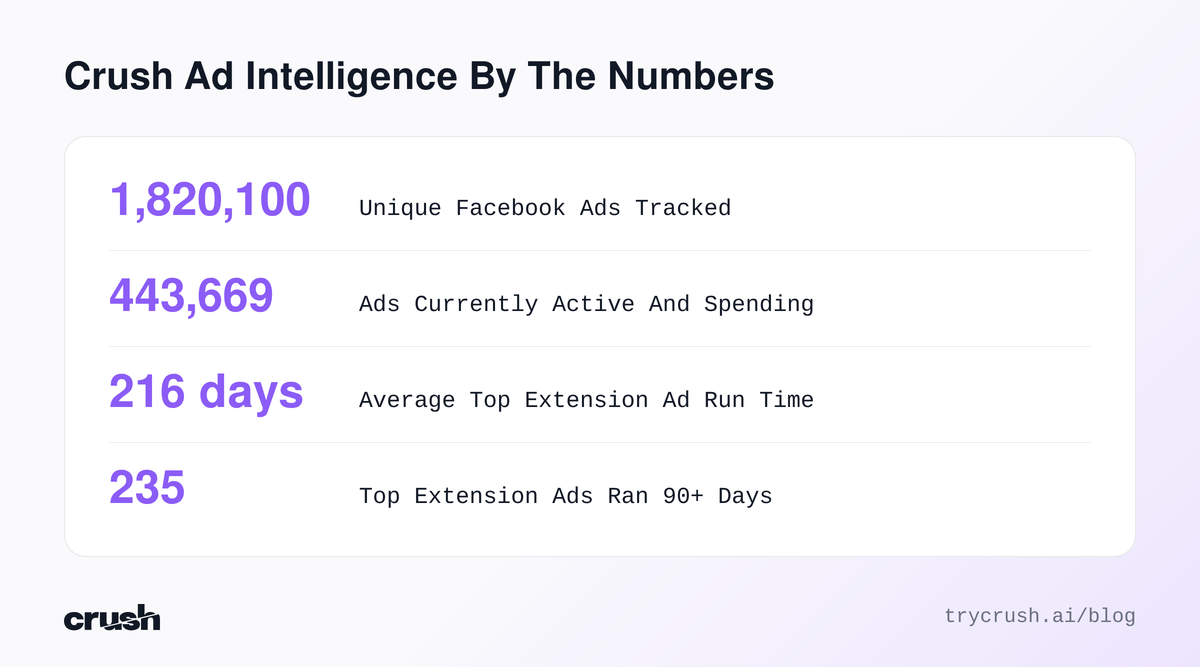
Scale matters in ad intelligence. Currently, our free public ad library tracks 1,820,100 unique Facebook ads. Of those tracked creatives, 443,669 are currently active and spending money right now.
Analyzing Longevity Data In The Extension Niche
To demonstrate why automated tracking beats manual saving, we can look at the specific niche of hair and eyelash extensions. Media buyers in this space are highly competitive, and ad fatigue sets in quickly.
Currently, our database shows 492 tracked ads match "extension" (312 active right now). Because our platform tracks how many days an ad has been running, we can identify proven winners.
Among top "extension" ads, average run time is 216 days; 235 of the top 400 ran 90+ days.
The 90-day mark is the proven winner threshold. Brands do not spend budget on a losing creative for three straight months. If an ad survives past 90 days, it is generating profitable returns.
Call To Action Button Trends
Knowing which call to action to use can significantly impact click-through rates. Our data reveals the exact buttons advertisers prefer when promoting extension services or products.
The most common CTA buttons on "extension" ads are:
- Shop now (27%)
- Message page (25%)
- Learn more (10%)
The high prevalence of the message page button highlights a specific strategy for local beauty studios. Instead of driving traffic to a generic landing page, they initiate direct conversations to book appointments. E-commerce brands strictly utilize the shop now button for physical hair extensions.
Real World Examples Of Winning Extension Ads
Our database reveals the exact ad copy and longevity of top-performing creatives. None of these required a media buyer to manually install a Foreplay Chrome extension. We tracked these automatically.
Amazing Lash Studio
This local service ad is running for 1510 days. It has been relaunched 0 times. The advertiser utilizes the "sign up" CTA.
The opening line reads: “Amazing Lash Studio Oro Valley - providing eyelash extensions in Tucson, AZ. Look AMAZING with our high quality lash extensions!”. By calling out the specific city, they hyper-target local foot traffic.
The Lash Lounge
This campaign has been running 1450 days, relaunched 0 times. They selected the "like page" CTA to build local brand awareness.
The opening copy states: “Connect with your local Lash Lounge in Portland for customized lashes that will make you feel as beautiful as you truly are!”. This is a textbook example of a long-term community building ad.
Bunny Lashes & Beauty Studio
Based in Perth, this ad hit 1417 days active and was relaunched 0 times. Interestingly, they chose the "book travel" CTA to schedule studio visits.
The opening line is entirely benefit-driven: “Mt Pleasant based beauty studio. Eyelash extension, nails, waxing, makeup and gift shop.”. It clearly lists every service available to the local customer.
Impressions of Mayville Salon & Spa
This salon ad is running 1368 days, relaunched 0 times. They use the direct "call now" CTA to fill their booking calendar immediately.
The opening line reads: “Take a seat and treat yourself to a new cut, color, and style! Our stylists will warm up your look with the most desired hair colors of the season and give you ”.
Nikki Bella hair
Unlike the local salons, this e-commerce brand is running an ad for 1365 days, relaunched 0 times. They utilize the "shop now" CTA to drive direct online sales.
The opening line is short and punchy: “Be Beautiful Now| Wigs & Accessories”. They rely entirely on the visual creative to sell the product, keeping the text minimal.
Feature Comparison: Foreplay vs. Crush
Understanding the technical differences between manual saving tools and automated platforms is crucial. Here is a direct feature comparison for media buyers evaluating their software stack in 2026.
| Core Feature | Foreplay Chrome Extension | Crush (our product) |
|---|---|---|
| Ad Acquisition Method | Manual one-click saving by the user. | Automated tracking directly from the Meta Ad Library. |
| Performance Metrics | Lacks deep performance metrics and real-time product data. | Tracks active days running and duplicate relaunch counts. |
| Deleted Ad Protection | Ads are lost if not manually saved before deletion. | Keeps automated history, including ads that were taken down. |
| Campaign Execution | Requires external platforms to launch ads. | Fully automatically runs Facebook ads, scales winners, kills losers. |
| Creative Generation | A strictly read-only tool for building inspiration swipe files. | Can generate ad creative iterations from a winning reference ad. |
Duplicate Counts And Winning Ad Signals
Beyond longevity, our platform tracks duplicate counts. This metric measures how many times an advertiser relaunched the exact same creative in a new campaign.
When a media buyer tests a new video, they launch it once. If the cost per acquisition is too high, they turn it off. However, if the ad crushes its return on ad spend targets, the buyer will duplicate it into scaling campaigns.
A high duplicate count is a massive winning ad signal. Foreplay cannot show you this data because manual saving only captures a static file at a single point in time. Our platform tracks the entire behavior of the advertiser.
If you see a competitor duplicate an ad fifty times over six months, you know exactly what is driving their revenue. You can then use our platform to generate ad-creative iterations from that exact winning reference ad.
Automating Your Facebook Ad Workflow
Building a swipe file is useless if you cannot execute the campaign effectively. The Foreplay Chrome extension stops working the moment you save the video. You still have to write the copy, build the campaign, set the budget, and manage the daily optimization.
Crush operates as an end-to-end media buying solution. Once you identify a proven winner in our database, our AI takes over the execution.
Our platform fully automatically runs Facebook ads. It creates the campaigns in your ad account. It reads the incoming performance data daily. It scales the budgets on the winners and aggressively kills the losers. This entirely removes human emotion from the optimization process.
Who Should Pick Which Tool In 2026
Both tools serve distinctly different functions in the modern marketing stack.
You should pick the Foreplay Chrome extension if your primary goal is curating visual inspiration boards. If you run a creative agency that needs to pull aesthetics from TikTok or LinkedIn manually, Foreplay is a strong choice. It is highly regarded for streamlining the initial research phase for designers who just want to study visual trends.
You should pick our product Crush if you are a performance-focused media buyer who demands concrete data. If you want to know exactly how long an ad has been running, you need our automated tracking. If you want to eliminate the manual labor of campaign management, our AI execution is the clear winner.
Stop guessing which creatives will convert. Start making data-driven decisions based on historical ad longevity. View our pricing page to see how our platform can fully automate your Facebook ad scaling today.
How we got this data
The numbers in this article come from Crush’s ad library: 1,820,100 unique Facebook ads tracked via the Meta Ad Library, 443,669 of them active at the time of writing. Ad examples reference real advertisers and their public ads. Data queried on 2026-08-20. Third-party product facts are attributed inline to their sources.
Frequently Asked Questions
Common questions about this topic
1What does the Foreplay Chrome extension do?
2How much does Foreplay cost?
3What are the common complaints about Foreplay?
4Is there an automated alternative to the Foreplay extension?
About this article
This article was written with AI assistance. Ad examples and ad data come from the Crush ad library.
Written by
Albertas Pocius
Co-founder, CMOAlbertas is the Co-Founder and CMO of TryCrush.ai, bringing elite-level performance marketing expertise to the platform. With over $50M+ in combined Facebook and TikTok ad spend, Albertas has launched and scaled dozens of projects from zero, driven by a deep obsession with data and experimentation. He has trained 20+ media buyers, consulted 100+ companies, and is widely recognized as one of Europe’s early TikTok pioneers, likely the first to scale campaigns beyond $100K per day. Today, he also teaches advertising strategy at two colleges, shaping the next generation of media buyers.
Stop Guessing.
Start Crushing.
AI Ad Manager trained by world-class media buyers to generate your creatives and optimize your ads 24/7.
Learn more
Related articles
BigSpy Review 2026: Pricing, Features, and Honest Comparison
We review BigSpy's multi-platform ad tracking capabilities, break down its true costs for 2026, and compare it against our automated Facebook ad platform, Crush.
How to Search the Facebook Ad Library Like a Pro in 2026
Master the Facebook ad library with proprietary data from 1.7 million campaigns. Learn how to track ad longevity, spot hidden winners, and fully automate your creative testing.
AdSpy 2026 Review: Features, Pricing & Adspyder Alternatives
A detailed 2026 review of AdSpy features, pricing, and limitations. We explore how it compares to other adspyder alternatives and our execution platform, Crush.
3 Web Banner Ad Examples That Converted (2026 Data)
We analyzed millions of Facebook ads to find the best web banner ad examples. Here is exactly what top advertisers do to drive profitable conversions.