
Key Takeaways
- 1Instagram stories and reels support native GIF search directly through the sticker tray.
- 2You cannot upload a raw .gif file to your profile grid; you must convert it to an MP4 video first.
- 3Short looping creatives act as pattern interrupts in the feed.
- 4Top advertisers frequently run successful looping post ads for over 90 days.
- 5The most popular call to action for short looping post ads is Shop Now at 59%.
A direct guide to uploading looping animations natively to your Instagram Stories, Reels, and direct messages. Learn the specific file conversion steps required to post them on your main grid.
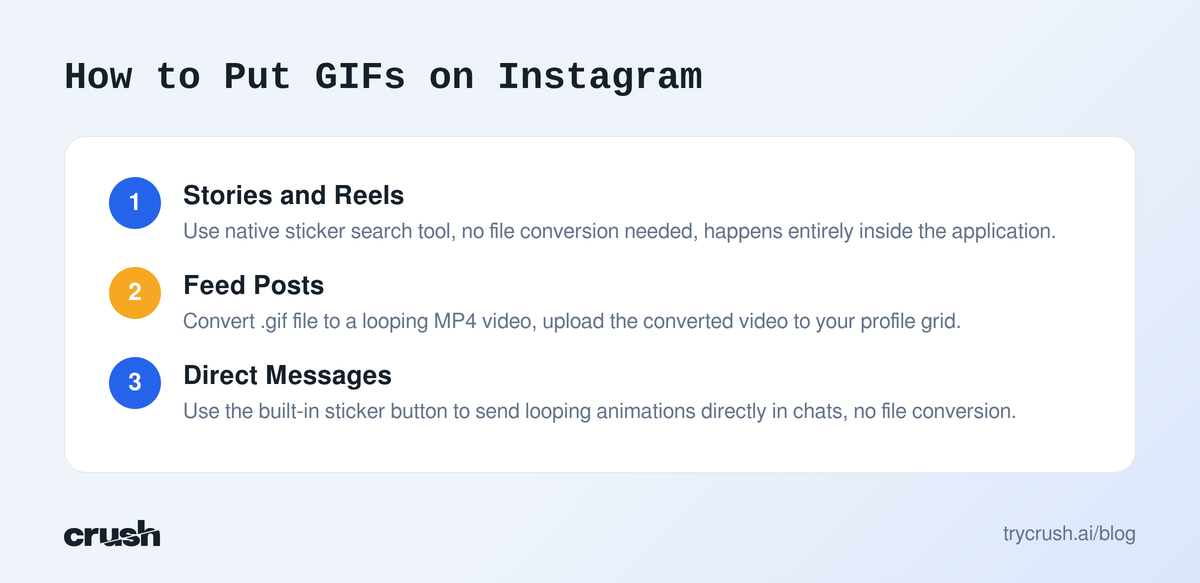
You can put GIFs on Instagram in three main ways. Use the native sticker search for Stories and Reels. Convert your .gif file to an MP4 video to post it on your feed. Or, use the built-in sticker button to send them directly in direct messages.
Can you post GIFs on Instagram natively?
Yes, but the exact method changes based on where you want the animation to appear. Instagram does not allow raw .gif file uploads to your main profile grid. If you are refining your overall Instagram marketing strategy, understanding these native format restrictions is crucial.
To bypass this restriction, you must convert the file to a looping video format like MP4. However, the application includes native integration for temporary content like stories, reels, and private chats.
How to put GIFs on Instagram Stories
You can add animated stickers to any story using the built-in search tool. This requires zero file conversion and happens entirely inside the application.
- Action: Swipe right from your home feed to open the story camera. Take a photo or select an image from your camera roll.
Expected Result: The image appears with a menu of tools across the top of your screen.
Practical Pitfall: Swiping too far right opens the live broadcast camera instead of the story camera. - Action: Tap the square smiley face sticker icon at the top of the screen.
Expected Result: A tray slides up from the bottom showing location, mentions, and a search bar labeled GIF.
Practical Pitfall: Tapping the text icon by mistake will only let you type, not search the visual library. - Action: Tap the GIF icon and type a keyword into the search bar.
Expected Result: The screen populates with looping animations matching your term.
Practical Pitfall: Using overly broad keywords returns irrelevant animations. - Action: Tap the animation you want to use.
Expected Result: The animation drops onto your story. You can pinch to resize it or drag it to reposition it.
Practical Pitfall: Placing the animation too close to the top or bottom edges will cause it to be covered by the application interface when published.
How to put GIF in Instagram feed posts
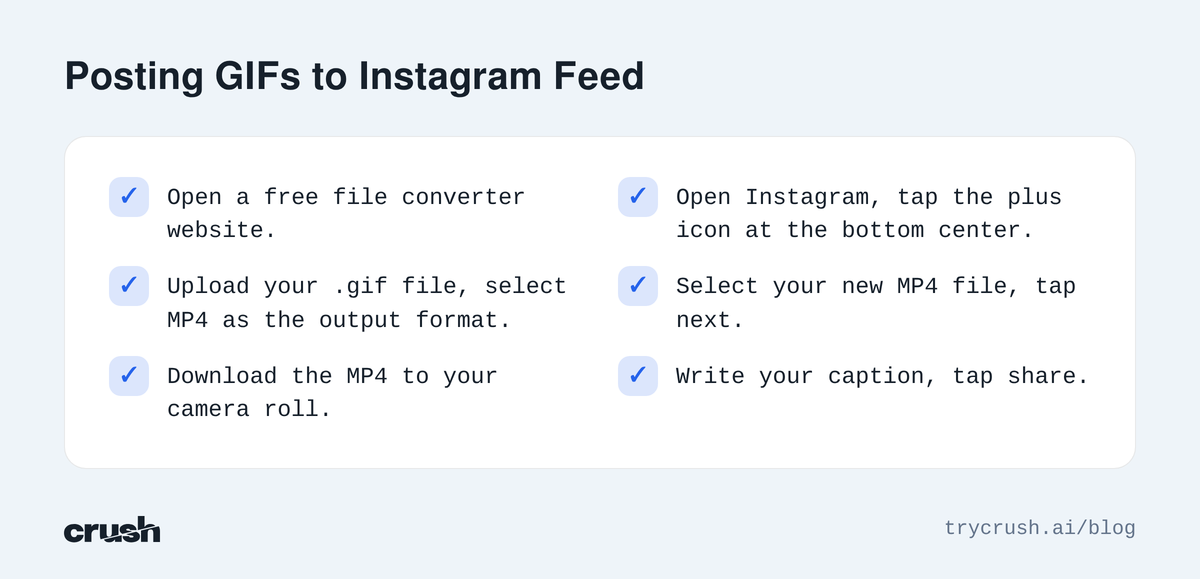
You cannot upload a .gif file directly to your profile grid. You must convert it to a video file first.
Converting the file
- Action: Open a free file converter website on your phone or computer.
Expected Result: The converter will prompt you to upload your source file.
Practical Pitfall: Some free applications leave a watermark on your video. - Action: Upload your .gif file and select MP4 as the output format.
Expected Result: The tool processes the file and generates a downloadable video.
Practical Pitfall: If the original file is less than three seconds long, Instagram might reject the video. Loop the animation in the converter to make the final video longer. - Action: Download the MP4 to your camera roll.
Expected Result: The file now appears in your recent videos folder.
Practical Pitfall: Saving it to a generic downloads folder makes it hard to find when you open the Instagram application.
Uploading the converted video
- Action: Open Instagram and tap the plus icon at the bottom center.
Expected Result: Your camera roll opens, displaying your recent photos and videos.
Practical Pitfall: Instagram will hide raw .gif files, which is why the previous conversion step is mandatory. - Action: Select your new MP4 file and tap next.
Expected Result: The application previews the looping video.
Practical Pitfall: Adding a music track over the video might distract from the visual loop. - Action: Write your caption and tap share.
Expected Result: The looping video appears on your profile grid, functioning exactly like an animation.
Practical Pitfall: Forgetting to select a good cover frame means your grid might show a blurry or empty square.
How to get GIFs on Instagram Reels
You can layer animations over your short-form videos using the native sticker tray. The process is similar to stories but includes duration controls.
- Action: Open the Reels camera and record your video or upload clips from your gallery.
Expected Result: The editing screen appears with a timeline at the bottom and tools at the top.
Practical Pitfall: Uploading vertical videos with black bars will make your final video look unprofessional. - Action: Tap the sticker icon at the top of the screen.
Expected Result: The sticker tray opens with a search bar.
Practical Pitfall: Selecting interactive stickers like polls instead of the visual search will clutter your video. - Action: Search for your keyword and tap the desired animation.
Expected Result: The animation drops onto your video preview.
Practical Pitfall: The animation will default to playing for the entire duration of the video. - Action: Tap the animation on your screen to bring up the duration slider at the bottom.
Expected Result: A yellow bounding box appears on the timeline.
Practical Pitfall: Forgetting to adjust this means the animation might block important parts of your video later in the clip. - Action: Drag the edges of the yellow box to choose exactly when the animation appears and disappears.
Expected Result: The animation now only plays during the selected timeframe.
Practical Pitfall: Making the duration too short makes the animation flash on screen, irritating viewers.
How do you put a GIF on Instagram chats?
You can reply to direct messages with looping animations natively. This requires no file conversion.
- Action: Open the application and tap the messenger icon in the top right.
Expected Result: Your inbox opens showing your recent conversations.
Practical Pitfall: Searching for a user here only searches your existing chats, not the whole platform. - Action: Tap on a conversation to open it.
Expected Result: The chat history appears with a message box at the bottom.
Practical Pitfall: If the other user has strict privacy settings, some interaction features might be disabled. - Action: Tap the sticker icon on the right side of the text input box.
Expected Result: A menu opens with a specific search bar for animations.
Practical Pitfall: Typing in the main message box instead of the search bar will just send standard text. - Action: Type your keyword, find the animation, and tap it once.
Expected Result: The animation immediately sends to the chat.
Practical Pitfall: The application does not ask for confirmation. The moment you tap the image, it sends.
How to use a GIF on Instagram comments
Instagram allows users to reply to feed posts with animations natively. This feature is built directly into the comment section.
- Action: Scroll to a feed post and tap the speech bubble icon to open the comments.
Expected Result: The comment thread opens with a text box at the bottom.
Practical Pitfall: The original poster might have comments turned off entirely. - Action: Tap the sticker icon on the right side of the comment box.
Expected Result: A search tray opens pulling from the native animation library.
Practical Pitfall: If you do not see the icon, your application is likely out of date. Update the software. - Action: Search for a reaction and tap it.
Expected Result: The animation posts immediately as a new comment.
Practical Pitfall: You cannot add text to the same comment line as the animation.
How advertisers use looping posts on Instagram
Brands frequently convert short animations into video ads to capture attention in the feed. Crush, our platform, tracks these campaigns automatically to analyze what works.
Our product Crush is an AI Facebook ads platform that fully automatically runs Facebook ads. It creates campaigns, scales winners, and kills losers. It also tracks competitors through the Meta Ad Library and keeps history, including ads that were taken down.
Ad longevity data for post campaigns
When advertisers upload a converted animation as a post ad, they often let winning creatives run for months. A high duplicate count in our system means an advertiser relaunched the same creative, which is a strong winning ad signal.
- Crush's ad library tracks 1,768,902 unique Facebook ads (440,131 currently active).
- 2,521 tracked ads match the exact "post" format (368 active right now).
- Among top post ads, average run time is 61 days.
80 of the top 400 post ads ran 90+ days, which is the proven winner threshold.
Top calls to action for looping creatives
When brands figure out how to add GIFs to Instagram ads, they use specific calls to action to drive clicks.
| Call to Action Button | Frequency on Post Ads |
|---|---|
| Shop Now | 59% |
| Learn More | 15% |
| Message Page | 5% |
Real examples of winning short post ads
Our ads library contains millions of Facebook advertising examples across niches, with longevity data. We can see exactly what text brands pair with their short visual loops. You can view this data in our free public ad library.
- XCMG Group: This post ad is running 762 days and relaunched 1x with the CTA get offer. Opening line: "Our Guiding Principle: At XCMG, our focus is on customer care, driving us to continuously innovate to meet the evolving market demands.🤝🤝🤝 We're excited to s".
- ArtiScience Hair Centre: This ad ran 637 days and relaunched 4x with the CTA get quote. Opening line: "⭐ Award-winning hair loss treatments ⭐ Designed by Korean doctors ⭐ At the ArtiScience Hair Centre, we let science & technology bring us the best of hair growth".
- Film/Art Gallery: This ad is running 599 days and relaunched 4x with the CTA shop now. Opening line: "Begin your journey into cinematic art! Discover rare, authenticated movie posters from iconic films and start your collection today. 🎬🎥🎞️".
- Motherlove Herbal Company: This ad ran 565 days and relaunched 1x with the CTA shop now. Opening line: "Organic herbal body care and supplements for motherhood from pregnancy, birth, postpartum, breastfeeding, to baby".
- Amini's: This ad is running 551 days and relaunched 2x with the CTA shop now. Opening line: "Sauna rooms enhance any space. Master bathrooms become European spas, and home gyms come full-circle with pre-workout warm-ups and post-workout recovery. Amini'".
Automating your ad creative process
If you see a competitor using a clever animation, you can use our system to build your own version. Crush can generate ad creative iterations from a winning reference ad.
You do not need to guess what visuals hold attention. By referencing ads that survive past the 90-day mark, you start with proven frameworks to build a data-driven creative strategy. Our paid plans start with a trial, and you can see current pricing at trycrush.ai/pricing.
How we got this data
The numbers in this article come from Crush’s ad library: 1,768,902 unique Facebook ads tracked via the Meta Ad Library, 440,131 of them active at the time of writing. Ad examples reference real advertisers and their public ads. Data queried on 2026-08-12. Third-party product facts are attributed inline to their sources.
Frequently Asked Questions
Common questions about this topic
1Can you post GIFs on Instagram directly from your camera roll?
2How do you put a GIF on Instagram stories?
3Can you upload GIFs to Instagram comments?
4How to get GIFs on Instagram reels without covering the whole video?
Written by
Albertas Pocius
Co-founder, CMOAlbertas is the Co-Founder and CMO of TryCrush.ai, bringing elite-level performance marketing expertise to the platform. With over $50M+ in combined Facebook and TikTok ad spend, Albertas has launched and scaled dozens of projects from zero, driven by a deep obsession with data and experimentation. He has trained 20+ media buyers, consulted 100+ companies, and is widely recognized as one of Europe’s early TikTok pioneers, likely the first to scale campaigns beyond $100K per day. Today, he also teaches advertising strategy at two colleges, shaping the next generation of media buyers.
Stop Guessing.
Start Crushing.
AI Ad Manager trained by world-class media buyers to generate your creatives and optimize your ads 24/7.
Learn more
Continue Reading
How To Pause A Video On Instagram (2026 Guide & Ad Data)
A complete guide to pausing Instagram Reels and videos on mobile and desktop. Discover why top media buyers intentionally design ad creatives to force users to freeze the screen.
Magazine Adverts Examples: 5 Proven Winners For 2026
Magazine adverts examples show marketers how to blend editorial copy with striking visuals. We analyze five digital ads that borrow print tactics to achieve incredible longevity.
AdCreative.ai Review 2026: Features, Pricing & Real Data
AdCreative.ai is a popular AI asset generator, but does it deliver? We break down its features, pricing, and how it compares to automated media buying platforms.